
Your AI Sales Agent Is Only as Good as Your CRM: Getting Your Gmail Pipeline Ready for Automation
November 17, 2026 · 5 min read
A sales team signs up for an AI agent on Monday and connects it to the shared inbox. By Wednesday, the agent has sent a friendly check-in to a client who renewed last week and a cold intro to someone who asked to be taken off the list in March. The agent was doing what the data told it to do: the CRM still showed the client as an open opportunity, and the opt-out request was sitting in a Gmail thread that nobody had logged.
Most problems with AI sales agents start long before the agent is switched on. An agent that handles prospecting, follow-ups or lead qualification reads your CRM the way a new hire reads a handover document, except it won't stop to ask when something looks odd. For teams that run sales out of Gmail, getting ready for automation mostly means moving the important context out of email threads and into records an agent can read.
Can an AI sales agent work straight from Gmail?
Technically it can, since plenty of agents can read an inbox and Gmail has labels, stars and a good search bar. Labels work well as a filing system for a person who remembers why each one was created. An agent has no such memory, so when it opens a thread it sees messages and timestamps and has to guess the rest: who the buyer is, which company they work for, whether a deal exists at all, and what was promised on the last call.
Guessing holds up on short, tidy threads and falls apart on forwarded chains, on a colleague CC'd halfway through, or on a prospect who suddenly replies from a personal address. Sales teams fix this with a CRM, and teams that already spend their day in the inbox usually choose from the best gmail based crms because records sit right next to the emails and new threads get attached to the right contact as they arrive. With a CRM in place, the agent reads a contact, a company, a deal stage and a dated history of activity, so it has far less to guess.
Do AI SDRs work for real sales teams?
AI SDRs can work well, and the deciding factor is usually the data underneath them. Salesforce's 2026 State of Sales report, based on a survey of 4,050 sales professionals, found that top-performing sellers are 1.7 times more likely to use AI agents for prospecting than underperformers. In the same report, 51% of sales leaders using AI said disconnected systems were slowing their AI initiatives down. Adam Alfano, EVP of Sales at Salesforce, summed it up this way: "Stand-alone agents without comprehensive customer context tend to fail."
Most CRMs aren't in shape to provide that context. In Validity's State of CRM Data Management in 2025 survey of 602 CRM users, 76% said less than half of their organization's CRM data is accurate and complete, and 37% said they had lost revenue as a direct result of poor data quality. When a human rep opens a stale record, they often notice that the contact left the company two years ago. An agent sends the email anyway, and it can repeat the same mistake across 400 records before anyone checks the sent folder.
What does an AI agent need from each CRM record?
The list is shorter than most people expect. What matters is that the same fields are filled in on every open record, because an agent treats an empty field as information. Before you connect anything, check that each active deal has:
-
A primary contact with a current work email, linked to a company record
-
A deal stage that reflects where things stand with the buyer right now
-
The date and channel of the last two-way conversation (an automated newsletter open doesn't count)
-
An owner, so the agent knows whose name goes in the signature and who to alert
-
A next step with a date attached
-
Contact preferences, including any request to stop emailing
Notes help too, although agents use them unevenly. A line like "CFO wants pricing for 25 seats, decision after Q1 budget review" gives an agent something specific to act on. A note that says "good call, follow up" gives it close to nothing.
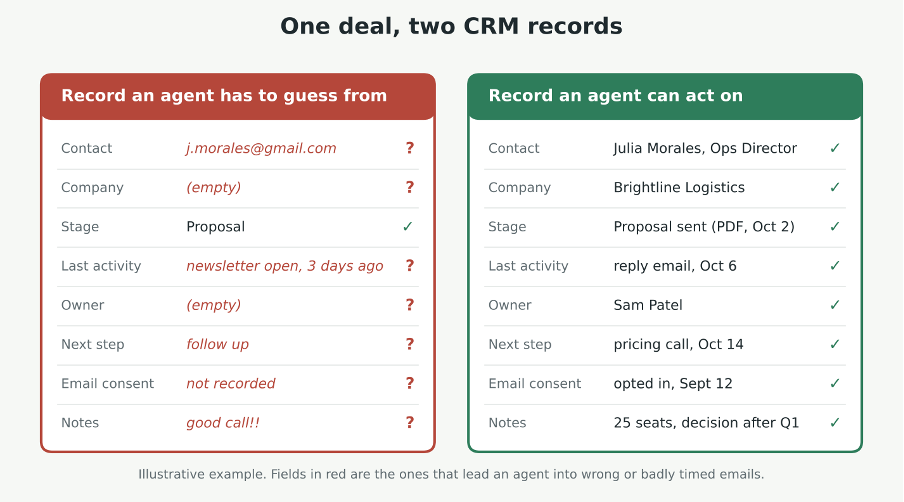
The same deal recorded two ways. An agent can work safely from the record on the right, while the one on the left leaves it guessing.
How do you clean up Gmail sales data before automating it?
Start with duplicates, since they cause the most embarrassing mistakes. In Gmail-centered teams, the same person often shows up once from a web form and again from a reply they sent from their phone's personal account. Merge those records and keep the most recent work address as the primary email.
Next, close the deals that have already gone quiet. Any opportunity with no two-way conversation in roughly 90 days should be marked lost or moved to a nurture list, depending on how your team handles old leads. If those deals stay open, the agent assumes the buyers are still in play and keeps writing to them.
Stage definitions are the step teams skip most often. Suppose "Proposal sent" means a PDF went out for one rep, while for another rep it means a price was mentioned on a call. The agent has no way to tell which follow-up fits. Write down what has to be true for a deal to enter each stage and what moves it to the next one, and keep the wording short enough to fit on one screen.
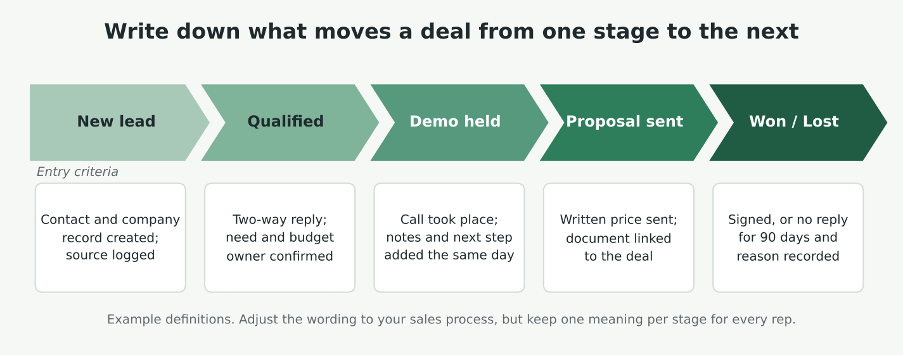
Short entry criteria for each stage give reps and the agent the same definition of where a deal stands.
After that, turn on automatic email logging so new threads attach to records without anyone copying them over by hand. Where you can, replace free-text fields with dropdowns for things like industry, lead source and deal size. An agent filters far more reliably on a fixed value than on whatever a rep typed at the end of a long Friday.
Which sales tasks should you hand to an AI agent first?
Start with tasks that need little data and where a mistake costs almost nothing, and leave autonomous outreach for later. To place each task, ask two questions: how much clean data it depends on, and how much damage an error would do. People often search whether AI is going to replace sales reps, and as of 2026 the practical answer is that agents are taking over the repetitive parts of the job while reps keep the conversations where judgment matters.
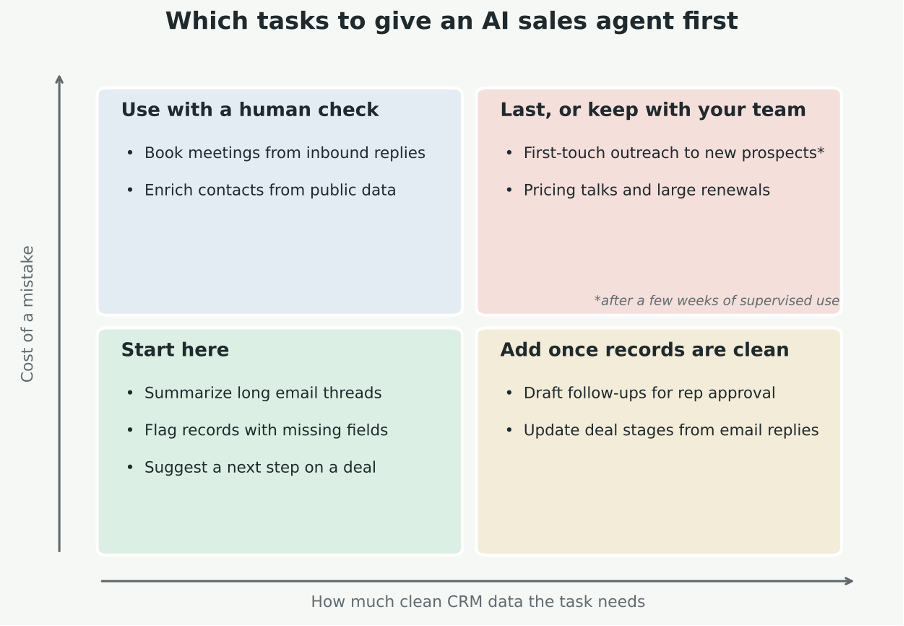
Plot each task by how much clean data it needs and how costly a mistake would be, then automate from the bottom left.
Summarizing long threads, suggesting the next step on a deal and flagging records with missing fields are good first candidates, because an error there is cheap and easy to spot. Drafting follow-ups for a rep to approve comes next. Fully autonomous outreach to new prospects belongs at the end of the list, after you have watched the agent work on your data for a few weeks and you trust what it does with it. Pricing negotiations and renewals with large accounts should stay with your team either way.
How do you know if the agent is helping?
Pick a few numbers before launch so you have something to compare against later. The share of agent-written drafts that reps send without edits is a good early signal of whether the agent understands your deals. You can also track how often reps have to correct fields the agent updated, and compare reply rates on agent-sent emails with the ones your team writes.
If you are comparing agents in a marketplace or directory, check how each one connects to your CRM before you look at the feature list. An agent that reads and writes records through a native integration or a documented API keeps your records current as it works, while an inbox-only agent tends to leave context scattered across threads the way it was before. Whichever you pick, give it a small group of deals first, such as one rep's open deals, and expand once the numbers hold up for a month or so.