
How to Prevent Product Detail Drift in AI Generated Video Ads
October 27, 2026 · 4 min read
A desk lamp appears in the opening shot with a brushed-metal hinge and a narrow oval base. Ten seconds later, the hinge has disappeared, the base is round, and an invented button lights up on the stem. The video looks convincing at a glance, but it cannot represent the actual product. Such drift becomes harder to catch when an AI agent hands the brief to a video tool.
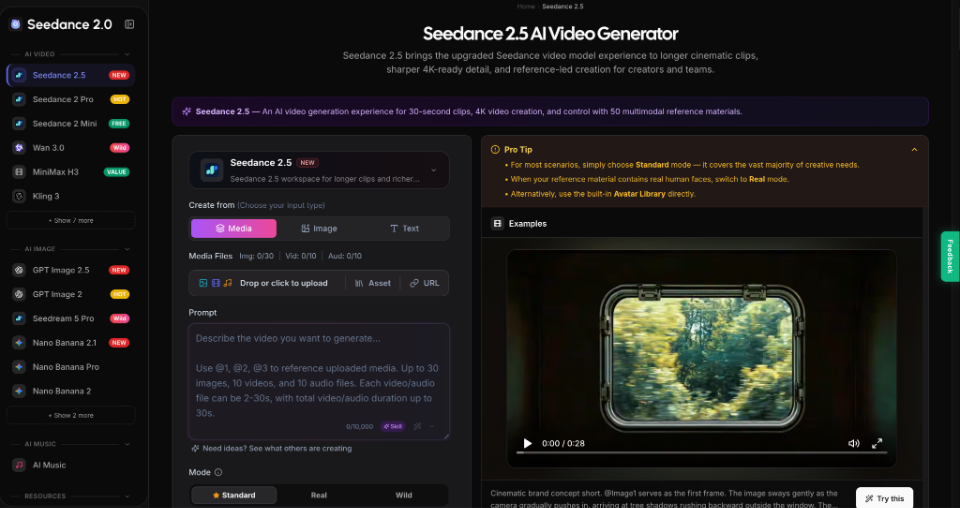
Descriptive prompts often capture mood better than exact physical attributes. A storyboard may still leave the generator guessing about shapes, labels, or moving parts. A reference-led workspace such as Seedance 2.5 offers a way to bring visual materials into the generation stage. A reliable workflow must also define fixed details, review outputs, and route errors for correction.
Separate Product Facts From Creative Choices
Before generating footage, divide the brief into two lists: attributes that must not change and elements the creative team may interpret. A lamp's hinge location, base shape, power cable, and available colors belong on the fixed list. Lighting, camera movement, background styling, and pacing usually have more flexibility. Otherwise, attractive variations can quietly alter the product.
Give every fixed attribute a source and a verification method. The source might be an approved product photograph, dimension drawing, packaging proof, or physical sample. A reviewer should be able to point to the evidence rather than deciding whether the result merely feels plausible. Resolve conflicting source materials before generation.
Build a Reference Pack With Clear Roles
More reference files do not automatically produce a more faithful result. Choose materials that answer different questions: one front view for silhouette, one side view for depth, a close-up for the hinge, and a short authorized clip showing how the lamp folds. Name the files by purpose so an agent or human operator can recover their role during revision.
Label What Each Reference Controls
A compact reference manifest can specify four fields for each file: asset name, intended use, protected detail, and permission status. For instance, lamp_side.jpg may define hinge placement but say nothing about the background. A motion clip may guide a camera move without authorizing a change to the lamp's geometry. Do not let a style reference define product facts.
Keep Unverified Claims Out of the Frames
The brief should also distinguish visual depiction from proof. An animation that shows a lamp surviving rain does not establish water resistance. An apparently accurate demonstration of a moving joint does not confirm mechanical performance. Keep technical claims tied to verified specifications, and use filmed evidence when a demonstration must prove how a physical item behaves. Treat generated footage as a creative asset, not independent product testing.
Generate One Controlled Test Before Variations
Write a shot plan with a small number of observable beats. For a 30-second concept, the opening might show the lamp on a desk, the middle might show a gradual camera move toward its hinge, and the ending might return to a clean product silhouette. Describe what moves, what stays still, and which product attributes must remain unchanged. Avoid stacking unrelated actions into one sentence.
With the approved assets ready, an operator can use Seedance for the video-generation step: select the media input, upload the relevant images and optional motion reference, then describe their roles in the prompt. The page supports reference-based creation and clips up to 30 seconds. Choose duration, ratio, and resolution, then compare the result with approved product views.
Make the first run diagnostic rather than decorative. Use one background, one lighting direction, and one camera path. A drifting hinge is easier to diagnose without people, reflections, fast transitions, or other products. Record prompts, reference versions, settings, and output IDs for comparison.
Review the Clip at Fixed Checkpoints
A beautiful opening frame can hide errors that appear only during motion. Inspect the first clear product view, the point of greatest movement, and the final hero shot. Scrub through the frames between them when a part rotates, folds, or becomes occluded. For critical packaging text or labels, inspect individual frames at full size; high resolution alone does not ensure correct lettering.
Use a short acceptance checklist with unambiguous outcomes:
- Identity: Does the silhouette match the approved reference from every visible angle?
- Components: Are the hinge, controls, cable, and surface finish still present and correctly placed?
- Claims: Does any visible action imply a capability that the product team has not verified?
- Continuity: Do colors, proportions, and attachments remain consistent through movement?
- Rights: Were all reference images, logos, people, and audio used with appropriate permission?
Classify each item as pass, fail, or requires human review. An agent can organize timestamps and comparison frames, but a responsible reviewer should approve brand-sensitive and factual decisions. A result that fails an identity or claims check should not advance simply because its composition is appealing.
Correct the Source of Each Failure
If the lamp's silhouette changes from the first frame, replace ambiguous reference views or strengthen the geometry instruction. If it stays correct until the camera circles behind it, simplify that move or supply a legitimate rear view. If the closing frame shows invented packaging text, remove the generated text and add verified typography later in a conventional editor.
An AI agent can make this iteration more systematic by preserving a small failure record: timestamp, defect, likely source, revised input, and next review owner. Change one major variable per test whenever possible. Rewriting the entire prompt after every failure obscures which correction helped, and repeated generation without a stopping rule can consume time and credits without producing an acceptable asset.
Make Accuracy the Final Delivery Gate
Product-video workflows should end with an evidence-backed acceptance decision, not a vague impression of realism. Keep an approved reference set, separate factual constraints from creative freedom, test a controlled shot, and examine the output at moments where visual drift is most likely. These practices remain useful whether the work is coordinated by people, agents, or both.
For a launch concept, a faithful draft may be enough to discuss camera language and pacing. For a product demonstration or claim-bearing advertisement, require verification against actual specifications and, where necessary, real footage. That boundary makes approvals, revisions, and rejections defensible.