
How to Build an AI Image Generation Agent With Human Review
October 27, 2026 · 4 min read
An image generation agent can turn a request into visual drafts, but an attractive picture is not necessarily a usable asset. A product label might be distorted, the dimensions wrong, or the scene inconsistent with the brief. When those images flow into a website or campaign, small mistakes become public mistakes. A useful agent needs more than a prompt and a model connection.
Separate planning, generation, checking, and approval into distinct stages. That design makes it easier to replace a model without rebuilding the workflow. For developers needing several AI model categories, an OpenAI-compatible gateway such as ToAPIs can serve as a shared access layer. This guide builds an agent around measurable requirements and a human release decision.
Define the Agent's Job Before Choosing Tools
Start with one recurring task, such as preparing three illustrations for a weekly newsletter. Specify who submits the request and what the agent returns. Avoid instructions like “make something professional,” which offer no reliable success criterion. A workable brief states the subject, audience, style, aspect ratio, prohibited elements, and number of candidates.
Define the output contract too: three images, their prompts, generation statuses, and a review checklist. The agent should deliver drafts to a private queue, not publish them. Visual quality and factual accuracy differ: a realistic rendering of a product can still misrepresent its features.
Turn Creative Requests Into Structured Briefs
Let a planning step convert language into fields the generation step can validate. A newsletter editor might request “a warm illustration of a bicycle repair workshop for a mobile header.” The agent extracts subject, lighting, composition, placement, and dimensions. Missing information should trigger a question or documented default, not an invented brand requirement.
Store the brief with its request identifier. If the editor changes the mood from warm to neutral, the record shows which candidates preceded that revision. Separate fixed constraints, such as product shape, from variable preferences. Use reference material only with permission to upload and process it. Make the handoff machine-readable: required fields must be present, dimensions should use accepted values, and reference URLs should pass an access check. This validation prevents the agent from spending credits on requests it already knows are incomplete.
Connect the Image Generation Step
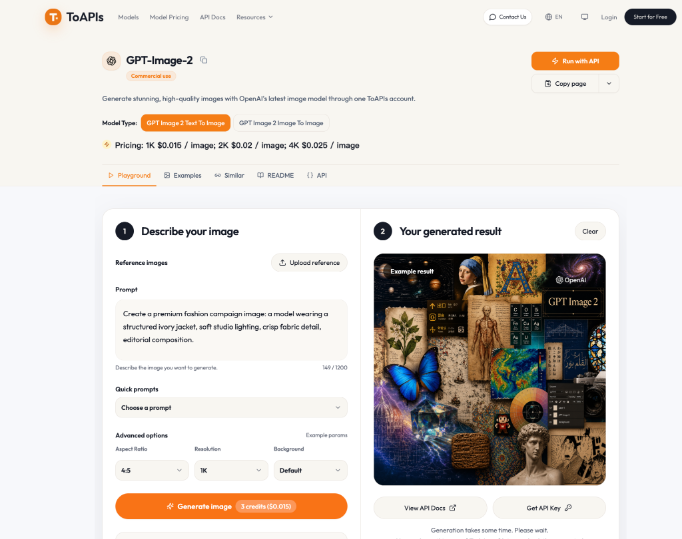
Treat the image model as one agent tool, not its entire decision process. With the GPT Image 2 API, the documented route is POST /v1/images/generations. A request includes model set to gpt-image-2 and a prompt; optional fields specify supported aspect ratios and resolution tiers. The endpoint returns an asynchronous task identifier, so the caller must check progress rather than assume the initial response contains an image.
For an approved reference image, reference_images accepts URLs. Local files must be uploaded first; base64 strings are unsupported in that field. Keep API credentials server-side, validate requests, and store each task identifier with its brief. This reconnects late results to the correct jobs when several run concurrently.
Test one prompt, one image, and a supported size-resolution combination first. Record settings and errors; documentation examples are not production benchmarks. Then add more candidates and reference-guided variations. The endpoint creates drafts; typesetting, exact branding, retouching, and final export may require separate tools or people.
Manage Asynchronous Jobs and Failures
Use explicit states: submitted, queued, processing, completed, failed, and awaiting review. Store task identifiers durably so a worker restart does not resubmit requests without checking status. Set a timeout and a limit on status checks. Flag unfinished jobs instead of reporting success. Errors need different responses. Invalid fields or unsupported sizes require correction; Authentication failures require credential checks. Rate limits may justify delayed retries with backoff, but cap attempts to prevent runaway usage. Log each failure category and action to distinguish a broken integration from temporary congestion.
Attach a unique internal job key before submission and check whether that job already has a provider task identifier. This guards against duplicate work after network interruptions. Also record the requested number of images and the actual completed outputs for later cost analysis.
Give Reviewers Specific Acceptance Tests
Display the original brief beside each candidate, with approve, revise, and reject actions. Reviewers should check subject accuracy, composition, text, unexpected objects, ownership concerns, and placement. For product imagery, compare details against an approved photograph rather than relying on realism.
A simple four-part scorecard can reduce vague feedback:
- Brief fit: Does the image include the required subject and exclude forbidden details?
- Technical fit: Are the dimensions, crop, and file quality suitable for the destination?
- Brand fit: Do style and colors follow approved guidance without inventing logos?
- Release safety: Are permissions, sensitive content, and factual claims checked?
Require a named person to approve publication. For failures, reviewers identify the criterion and request a targeted revision. The agent updates the relevant prompt field without discarding what worked. Keep approved files separate from rejected drafts so publishing systems cannot mistake unreviewed images for final artwork.
Test With a Small, Representative Batch
Before unattended runs, pilot twenty representative briefs: ambiguous instructions, references, challenging crops, and cases requiring rejection. Count completed jobs, human corrections, and candidates passing all checks. Track cost per approved asset, including retries and review time, not just model calls. Inspect failures by category. For repeated crop failures, change aspect ratios or composition instructions. For incorrect product details, tighten reference and approval rules. If jobs get stuck, improve recovery before raising concurrency. A narrow pilot reveals weaknesses without exposing an entire publishing operation.
Compare the pilot with a human-only baseline using the same types of briefs. Time from request to approved asset is more informative than raw generation speed. If review and repair take longer than manual production, simplify the agent's task before expanding it.
Keep the Human Release Boundary
An image generation agent earns its place by making repetitive preparation easier to manage, while preserving decisions that require context and accountability. Define the brief, record each asynchronous task, evaluate outputs against visible criteria, and send only approved assets onward. Over time, the same records can show which prompt patterns work, which errors recur, and which jobs deserve more automation. The next improvement should follow those observations rather than the assumption that every human check can be removed. A reliable workflow is one in which the team knows what the agent did, what it could not verify, and who approved the result.