
How to Build AI-Ready Content Infrastructure: Headless CMS Platforms Compared
October 22, 2026 · 6 min read
How to Build AI-Ready Content Infrastructure: Headless CMS Platforms Compared
It has become a common practice for businesses to add AI to their websites and online stores. We’re probably already at the point where not having an AI feature on a website even makes a company look outdated! AI tools range from product recommendation assistants to internal tools for employees. But choosing an AI model is only a first step here. The application also needs access to the business data behind its answers! Let's take an example. A customer opens a chat on an online store and asks, “Which laptop should I buy for video editing under €1,000?” To answer, the AI assistant needs to check the laptop specifications, compare prices and see which models are in stock.
But, this information may be stored in different systems. The company must decide how to a) make all these sources accessible to the app, and b) effectively combine the info it retrieves. There is a smart approach to this: a Headless CMS for AI applications. It can bring data from different sources together through a single GraphQL API. But how do you choose a solution that will work well with your AI application? Let's look at this Headless CMS platforms comparison to help you choose the right fit for your project!
What Does AI-Ready Content Infrastructure Mean?
The right setup has one goal: to make business info accessible to your AI-powered app. It includes:
- actual data (can take different forms)
- systems that store it
- tools that help the app retrieve the right data plus pass it to the AI model.
The AI-ready content infrastructure usually has several connected parts.
-
A knowledge base contains internal procedures and supports CMS knowledge management by making business information easier to organize, maintain, and retrieve for employees and AI-powered applications.
-
A content and integration layer. The application needs a consistent way to request information from these sources. APIs provide that access.
-
A retrieval layer to help the app find relevant details. For structured info, it can query specific fields or filter records by defined criteria. For large collections of documents, it might need full-text search or semantic search. Some apps use retrieval-augmented generation (RAG).
-
The AI application that coordinates the process. It interprets the user's request and obtains the relevant information. Then, it passes the info to the AI model along with instructions to respond.
How Data Retrieval Works Without a Unified Content Layer
Let's get back to our online store example, where the user asks for a laptop recommendation for video editing under €1,000. We need structured content for AI to analyze. Product attributes, price and stock details are the required data to answer the user question.
The backend sends multiple separate API requests. The app then processes and combines the results. Each system may return data in a different format. The backend must map the fields and match records using product IDs or SKUs. At this point, the application receives the context for the AI model. It selects the relevant results and checks whether the required information is available. Then it passes the data to the model with instructions for generating the answer.
In this case, the app needs to communicate with each data source separately. Each connection needs its own authentication, request handling, error handling and maintenance. The more sources an application uses, the more integration logic the team has to manage. Search adds another layer of work when the application uses it. The team may need to index documents and update the index when content changes. They have to ensure that outdated or unpublished information is no longer returned.
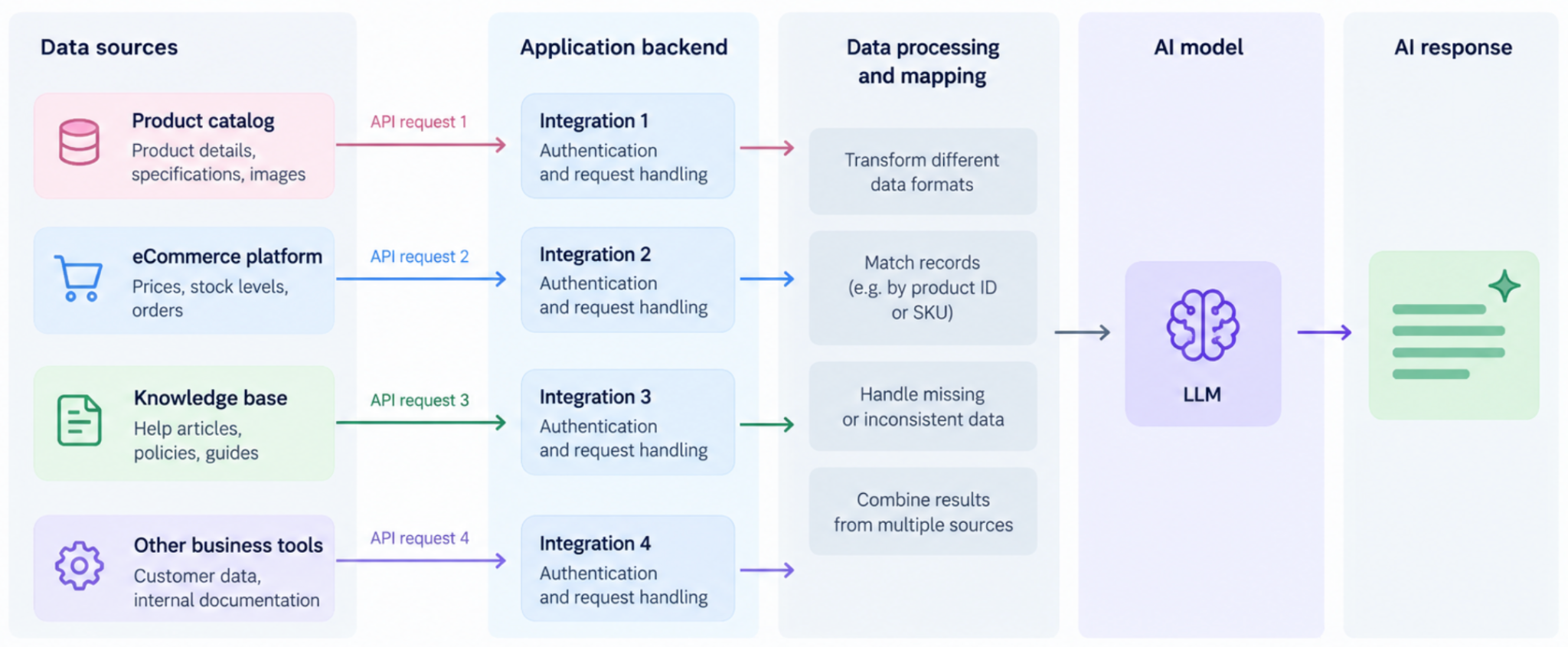
The maintenance burden increases with the growing number of sources and relationships. Developers end up managing not only the AI workflow, but also much of the logic required to connect, match and retrieve data.
How a Headless CMS Changes the Process
The customer is still looking for a laptop under €1,000 for video editing. But this time, we have a headless CMS that provides a shared API for content and data from connected systems. Product descriptions and specifications are stored in the CMS. Current prices and stock levels still come from the external eCommerce platform! Here's what happens:
The team configures the data sources. Developers define the content models in the CMS and connect the external APIs the app needs. They configure authentication and map the external fields to the GraphQL schema. Meanwhile, the commerce platform continues to manage prices and stock levels
The application sends a GraphQL query. It requests product specifications from the CMS and selected price and inventory fields from the connected commerce platform. It happens through the same GraphQL endpoint.
The CMS retrieves and combines the requested data. The CMS resolves fields stored in its own content models and retrieves the required fields from the configured external source. It then returns the results through the shared API.
The application prepares the context for the AI model to generate the answer.
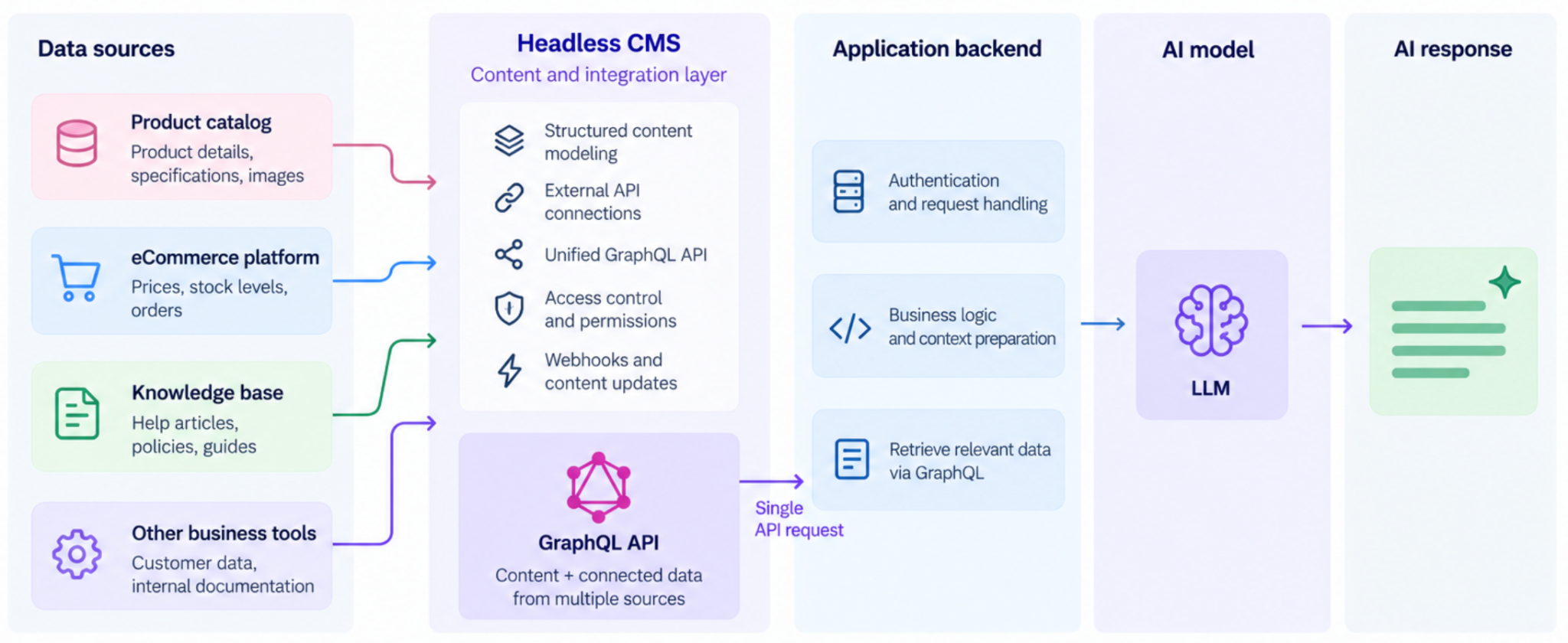
Now, with a CMS for AI-powered applications, developers don't need to build similar integrations for different apps. They also do not have to repeat field mapping and response handling and fix the same issues in several places. The team just configures an external source once, exposing the required fields through a shared GraphQL schema. Different applications can then request the data they need through the same endpoint. There is no need to build their own connections to every source. This setup also makes it easier to expand the system.
Key Features to Compare When Choosing a CMS for AI-Driven Workflows
Check features that affect integration effort, data access and AI app development:
1. Content Modeling
Verify: Can you define custom content types, fields and relationships? Can the app retrieve related records like products and manuals, without extra workarounds?
2. APIs and External Data Sources
The CMS must support GraphQL, REST and connections to external APIs.
3. AI Agent Integrations
Look for SDKs, webhooks and AI-specific tools such as MCP servers.
4. Data Freshness and Performance
Review caching, API limits and error handling, how quickly it retrieves external data.
5. Permissions and Security
Check access controls for content, API credentials, external connections. Public AI apps must not expose drafts, confidential documents, data intended for internal use.
6. Search and Retrieval
For structured records, API queries may be enough. Large document collections may require full-text or semantic search.
Comparison of Leading Headless CMS Platforms for AI Applications
1. Hygraph
With Hygraph, developers can define content models and access their data through the GraphQL API. They can also query selected data from connected REST and GraphQL APIs through the same endpoint with the Content Federation feature. Hygraph’s AI Assist helps teams generate, improve and translate content. AI Agents can handle tasks such as translation, summarization and SEO/GEO reviews. Teams can run these agents manually or configure workflows. AI Guidelines let them reuse instructions for brand voice, target audiences, terminology and compliance. The MCP server gives compatible AI assistants access to content and schema operations, subject to permissions.
2. Sanity
Sanity stores content as structured documents in Content Lake. Developers can query these documents using GROQ or GraphQL.
For AI agents, Sanity Context provides read-only MCP access to live datasets and indexed Knowledge Bases. An agent can query structured records or retrieve relevant information from a larger collection of documents. A separate MCP server supports other tasks, including running queries, inspecting schemas, managing releases and updating documents.
3. Contentful
Contentful organizes content into entries and fields. Its REST and GraphQL APIs let applications retrieve that content and its relationships. Its AI Actions support tasks such as translation and content transformation. Teams can configure the instructions and inputs for each task. Contentful also provides a Remote MCP server for compatible AI assistants.
4. Contentstack
Contentstack provides structured content models and REST and GraphQL APIs for content delivery and management. Its MCP server gives compatible AI agents access to content operations and other platform services. Agents can manage entries, inspect workflows, trigger automations or query analytics.
Best Practices for Preparing Content Infrastructure for Future AI Use Cases
-
Identify what your AI app usually needs to retrieve. These could be support policies, order details, etc. You will need these requirements to define content models and API queries.
-
Keep data structures consistent: clear field names, stable product IDs, validation rules. It will be easier to connect records from different systems.
-
Keep constantly changing data like prices and inventory in their own systems. Just make sure the app knows which source to query.
-
Plan for future AI agent development in advance. Establish reusable API queries, schemas and integration rules not to build a separate data access layer for every next chatbot.
-
Set necessary permissions to keep confidential data away from public-facing AI features.
-
Keep retrieved information up to date. Use webhooks to refresh dependent search indexes and caches when content changes.