
How to Build a Human in the Loop AI Agent Workflow for Short Form Video Production
October 15, 2026 · 4 min read
The strongest agentic content systems automate coordination while keeping people responsible for creative judgment, accuracy, and approval.

Feature image: a human creative director supervising a modular agent workflow.
Many teams describe a content workflow as “agentic” when it is really a chain of prompts. A prompt chain can be useful, but a production-grade agent workflow needs more: defined responsibilities, structured handoffs, persistent artifacts, validation rules, and a clear point at which a person approves the work.
Short-form video is a good test case because it combines strategy, writing, visual generation, motion, editing, and compliance. Each stage can benefit from automation, yet a fully autonomous pipeline can easily produce polished content that is off-brand, repetitive, or factually unsafe. The goal is therefore not maximum autonomy. It is controlled autonomy: agents handle repeatable coordination while humans own taste, truth, and accountability.
Start with roles, not tools
A resilient architecture begins by defining what each agent is allowed to decide. Tool selection comes later. For a lean video pipeline, four roles are usually enough:
- Brief agent: converts the campaign goal into a structured creative brief with audience, platform, length, message, tone, evidence, and constraints.
- Visual agent: proposes reference frames, maintains character and product continuity, and returns a small set of approved options.
- Video agent: creates motion variations, assembles a first cut, and records the settings used for reproducibility.
- Quality agent plus human reviewer: checks technical rules automatically, then routes the candidate to a person for final creative and compliance approval.
Keeping these roles separate improves observability. When an output fails, the team can identify whether the problem began in the brief, visual reference, motion step, or review criteria instead of blaming the entire system.
A practical human-in-the-loop architecture
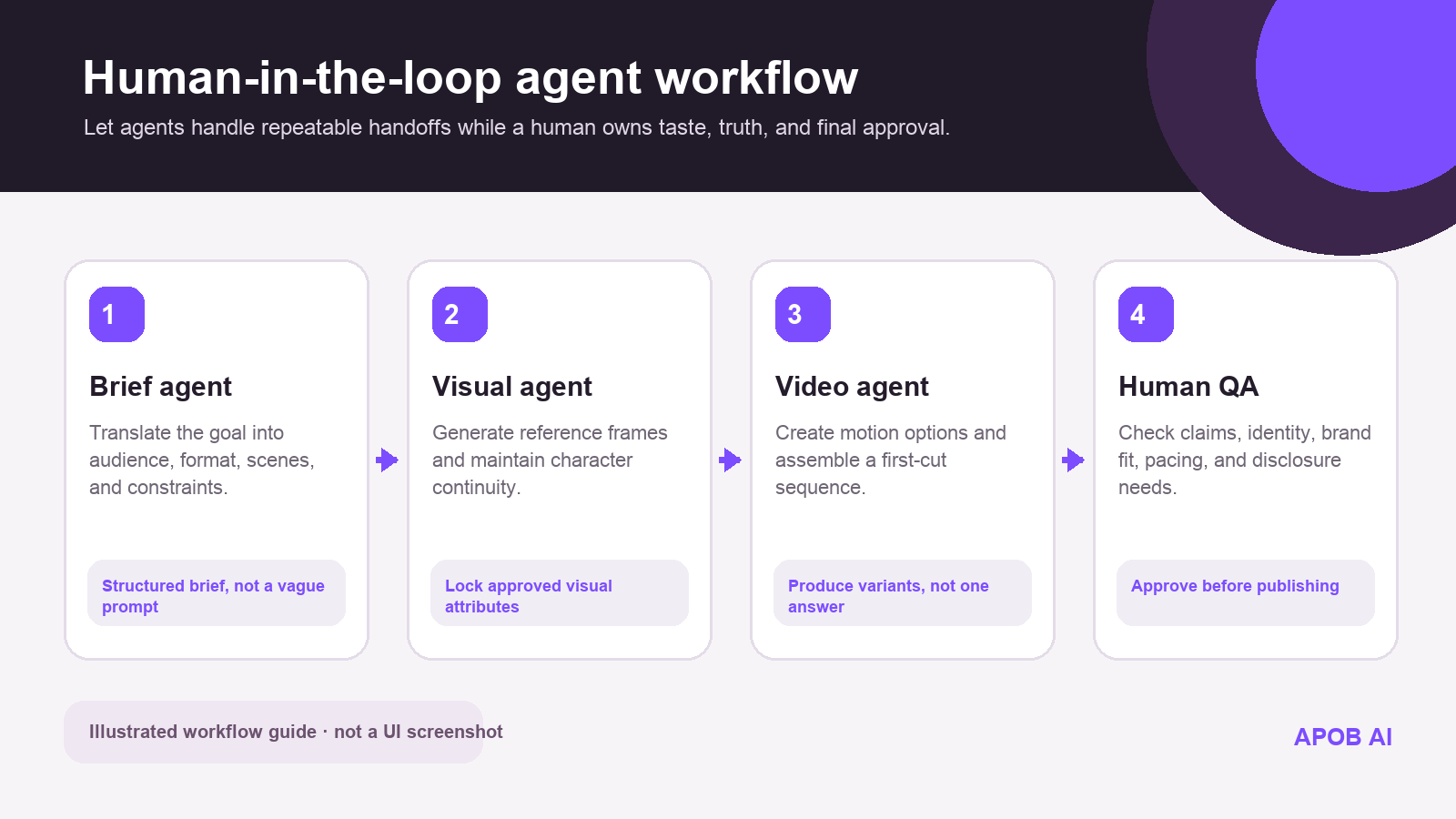
Figure 1. A human-in-the-loop agent workflow from structured brief to final approval; this is an illustrated architecture guide.
1. Turn the request into a machine-readable brief
The first agent should not write a script immediately. It should normalize the request into fields such as objective, audience, platform, aspect ratio, duration, scenes, mandatory claims, prohibited claims, visual references, and approval owner. A structured brief creates a contract between agents. It also gives the human reviewer a clear record of what the system was asked to do.
If the input is incomplete, the agent should ask for a missing constraint or apply a documented default. Silent guessing is dangerous because downstream agents will treat the guess as fact.
2. Create and lock a visual reference
The visual agent can generate several keyframes, but only one approved reference should become the source of truth for the next step. Store the selected image together with its prompt, seed or reproducibility settings when available, aspect ratio, model identity, palette, and any negative constraints.
This stage is also where teams choose a visual execution layer. A stack may include a Higgsfield alternative when it needs another way to explore character-led motion and creative visual variations. The important architectural principle is abstraction: the orchestration layer should call a capability such as generate_keyframe or generate_motion, not hard-code the entire workflow to one vendor interface.
3. Ask the video agent for bounded variations
A video agent works best when it is asked for a small, intentional variation set rather than an unlimited stream of outputs. For example, request three openings with the same product scene but different motion intensity. This creates a meaningful review choice and limits unnecessary generation cost.
Teams experimenting with an LTX 2 workflow or another video model should store the model name, input assets, prompt, duration, and version alongside each result. Those details make later comparisons possible and protect the pipeline from unexplained behavior when a model changes.
4. Make quality checks explicit
Automated validation can catch many predictable issues: missing scenes, incorrect aspect ratio, duration outside the allowed range, absent disclosure text, silent audio, or a mismatch between required and generated deliverables. It can also flag risky terms for review. These checks should return clear pass, fail, or needs-human-review states rather than a vague score.
The human reviewer then evaluates the dimensions that remain difficult to encode: whether the opening feels derivative, whether the character reads naturally, whether the brand voice is credible, whether an implied claim is misleading, and whether the content is appropriate for the audience.
Design the handoffs as artifacts
Agents should exchange versioned artifacts, not loose chat messages. A simple artifact set might include brief.json, storyboard.md, keyframe.png, generation_manifest.json, first_cut.mp4, qa_report.json, and approval_record.json. The exact format matters less than consistency.
Every artifact should include a project ID, version number, creator, timestamp, source references, and status. If the video agent creates a new version, it should reference the visual asset and brief versions it used. This lineage makes debugging, auditing, and reuse far easier.
Add stop conditions before adding autonomy
A safe system needs to know when not to continue. Useful stop conditions include:
- The brief contains an unsupported factual claim or lacks a source.
- The visual output changes a protected product attribute, logo, or identity cue.
- The generated person may resemble a real individual without documented permission.
- The cost or number of variations exceeds the project budget.
- Automated checks disagree or the confidence threshold is not met.
When a stop condition is triggered, the workflow should preserve its current artifacts and notify the assigned reviewer. It should not keep regenerating until something happens to pass.
Measure the workflow as a system
The most useful metrics go beyond views. Track first-pass approval rate, human review time, regeneration count, cost per approved asset, error type, model failure rate, and percentage of outputs with complete lineage. These metrics reveal whether the agent stack is genuinely reducing operational work.
Over time, teams can automate more of the stages that show stable performance. A recurring aspect-ratio check may become fully automatic. A final brand review may always remain human. That is not a limitation; it is good system design.
Final takeaway
The best short-form video agents do not behave like an unsupervised content factory. They behave like a disciplined production team: each role has a scope, every handoff leaves an artifact, risky conditions stop the workflow, and a responsible person approves the result. That architecture scales creative output while preserving the very qualities that make the content worth publishing.