
How Creators Use Video Face Swaps
October 16, 2026 · 6 min read
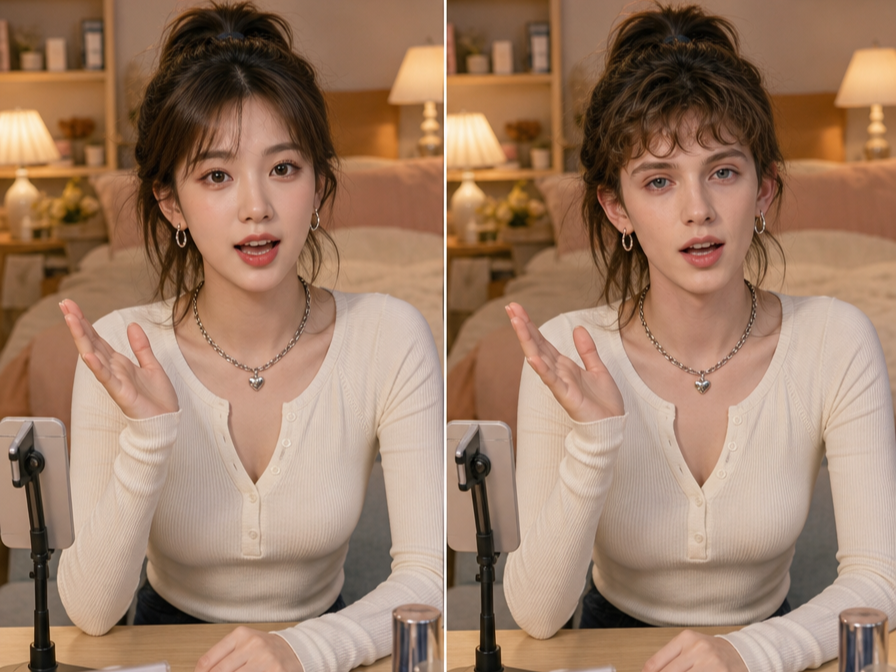
Short videos live or die in the first few seconds. A familiar face, surprising visual, or quick change can make someone pause before the next swipe. That’s why creators use video face swap tools to add a visual hook without building a complicated set, hiring a cast, or filming several versions of the same idea.
A face swap works best when it supports the story rather than replacing it. A creator might appear as a younger version of themselves, play two characters in one scene, or turn a simple reaction into a funny transformation. The strongest results feel intentional, clear, and relevant to the video’s point.
Tools such as EasyFaceSwap make this process accessible to creators who may not have editing experience. You usually upload a source video, choose a face image or another face video, let the software process the footage, and then review the result. The quality depends heavily on the source material, lighting, camera movement, and how clearly the face appears.
Creators can also use a dedicated Video Face Swap workflow when they want to work with moving footage instead of a single still image. That matters for Shorts, Reels, and TikTok videos because a convincing result must hold up across many frames, expressions, and head movements.
Why Face Swaps Work in Short-Form Video
Short-form platforms reward retention. If viewers watch beyond the opening moment, the video has a better chance of reaching more people through recommendations. Face swaps can create that first moment of curiosity because the viewer immediately sees something unusual but easy to understand.
The effect is especially useful when the visual change matches the premise. A cooking creator could swap into a celebrity chef parody, a gaming creator could act out two characters, or a comedian could switch faces during a conversation. The technology gives the audience a visual reason to stay, while the writing and performance provide the reason to finish.
A good face swap also reduces production demands. One person can record several roles in the same room, then create the appearance of a group conversation during editing. This doesn’t remove the need for timing, clean audio, or a strong script, but it can make a small creator’s production feel more varied.
There’s a trade-off, though. A poor swap can distract viewers, especially around the jaw, hairline, eyes, or mouth. If the face changes shape from frame to frame, the audience may focus on the effect instead of the joke or message. Creators should treat the swap as an editing choice, not a substitute for a clear idea.
Three Practical Creator Scenarios
Comedy sketches benefit from quick identity changes. A solo comedian can film a short argument between two characters and use a face swap to distinguish them. The creator can record each side separately, keep the camera position consistent, and switch faces at the edit points. This creates a simple back-and-forth that feels more like a scene than a standard talking-head clip.
The main benefit is character clarity. Viewers can understand who is speaking even when the creator stays in the same location and wears similar clothing. The swap can also deliver a punchline when it appears at the right moment, such as a serious character suddenly revealing the face of an overly confident friend.
Educational creators can use face swaps to make historical or fictional examples more memorable. A language teacher might demonstrate how two speakers use different tones, while a business creator could act as both a customer and a salesperson. A history channel might use a clearly labeled parody format to present a short first-person explanation from a historical figure.
The benefit is stronger visual storytelling. Instead of explaining every role through narration, the creator lets the audience see the change. This can make abstract concepts easier to follow, particularly when the video needs to communicate a contrast in less than a minute.
Commentary and reaction creators can use face swaps to heighten a response. A creator discussing a strange product, viral trend, or movie scene might briefly swap into a character that represents the public reaction. The effect can turn a predictable statement into a visual joke, provided the transition happens quickly and the original point remains clear.
The benefit is pacing. A short visual interruption can reset attention before the viewer loses interest. It works best as a brief beat inside the video rather than a constant effect covering every sentence.
| Creator scenario | Useful face swap idea | Main benefit |
|---|---|---|
| Comedy sketch | Switch between two characters | Makes roles clear |
| Educational video | Present two viewpoints | Adds visual explanation |
| Commentary or reaction | Show an exaggerated response | Refreshes pacing |
| Trend or parody | Recreate a recognizable format | Creates instant context |
These scenarios share an important principle: the effect has a job. It should clarify a character, add a joke, show a contrast, or create a faster visual rhythm. If removing the swap would make the video stronger, the effect probably wasn’t needed.
A Practical Workflow for Creating a Short
Start with the concept before opening the editing tool. Write the first line, decide what the viewer should notice, and identify the exact moment when the face swap adds value. For a 20-second Short, the effect may only appear for three or four seconds. That’s often enough to create the hook without making the video feel repetitive.
Next, record clean source footage. Face the camera as directly as possible, use even lighting, and avoid heavy shadows across the eyes or cheeks. Keep the camera stable for your first attempt. Fast turns, hands covering the face, low light, and strong motion blur can all reduce the quality of the final result.
Record each required performance with similar framing. If you’re playing two characters, keep the camera at the same height and leave enough space around your head. Try to match your posture and speaking pace when the clips need to cut together. The better the source footage matches, the less work the software has to do.
Choose a face source that is clear and properly authorized. A sharp, front-facing image usually produces a more stable result than a dark photo, side profile, or heavily filtered selfie. If you’re using another person’s likeness, get their permission before uploading or publishing the material. Don’t use a real person’s face to imply that they said or did something they didn’t.
After processing, watch the full clip rather than judging only the first frame. Look for flicker, unnatural mouth movement, edges that shimmer, or a face that changes when the head turns. Check the opening two seconds especially closely, since a strange transition there can cause viewers to swipe away.
Finally, edit for the platform. Add captions because many people watch with sound off, but keep text away from the face. Trim pauses, raise the energy of the opening line, and make the visual change easy to understand. If the audience needs a long explanation before recognizing the joke, the concept needs a simpler setup.
What Keeps the Effect Convincing
Lighting consistency matters more than many beginners expect. If the source video has cool light and the face image has warm light, the swap can look pasted on. Recording near a large window can work well, but avoid changing sunlight during the shoot because shifting brightness makes matching harder.
Expression matters too. A smiling source face may look unnatural when placed over a serious performance. Choose a face image or clip with a similar expression, angle, and eye direction. The closer those details match, the less artificial the result tends to feel.
Keep the duration short when you’re testing a new tool. A quick transformation is easier to hide than a full minute of constant face replacement. Short sections also give you more options if one part of the footage renders poorly. You can cut back to the original face, add a reaction shot, or use a caption to make the transition feel deliberate.
Creators should also label parody, fictional scenes, or altered media when viewers could reasonably misunderstand it. Clear disclosure protects trust and reduces confusion. Avoid using face swaps for impersonation, fraud, harassment, political deception, or misleading claims about real events. A funny effect is not worth damaging your audience relationship or someone else’s reputation.
Building a Repeatable Content Format
The best creators don’t use face swaps randomly. They develop a repeatable format that viewers recognize, such as “two sides of the argument,” “what I expected versus what happened,” or “one person plays every role.” Once the structure works, the creator can change the topic while keeping the production process familiar.
Track more than views when testing the format. Watch the retention curve, rewatches, comments, and shares. If viewers leave as soon as the swap appears, the effect may be confusing or poorly timed. If they rewatch the transition or mention the characters in comments, that’s evidence the visual supported the story.
A face swap can help a small creator produce more varied Shorts with limited equipment. It can make a solo performance feel like a cast, give educational content a memorable visual layer, and add rhythm to commentary. The strongest results come from careful footage, a clear purpose, and honest presentation.
Used that way, video face swap is not just a novelty. It becomes one practical tool in a creator’s editing process, helping a good idea earn the pause, watch time, and replay that short-form video demands.