
Best Bulk Email Service: 3 Platforms for Sending Mass Email in 2026
October 12, 2026 · 14 min read
Prices, plans and features checked on October 7, 2026 on each tool’s official website. Ratings checked on G2 and Capterra on the same date.
TL;DR
SendPulse is the best bulk email service for most small and growing businesses in 2026: its free plan sends up to 15,000 emails a month to 500 subscribers, paid plans remove the monthly send cap, and the same account adds AI copywriting, automation, SMS and chatbots. Brevo fits teams that send high volumes to big contact lists, because it prices by emails sent rather than contacts. Mailchimp fits brands that want polished templates and 300+ integrations and don’t mind paying more as the list grows.
Introduction
Sending one email to 20,000 people is easy. Getting it into 20,000 inboxes is the hard part. Gmail and Yahoo now treat anyone who sends more than 5,000 messages a day as a bulk sender, and both expect you to keep your spam complaint rate below 0.3%, according to Yahoo’s sender requirements and Google’s email sender guidelines.
That changes what you should look for in a bulk email service. A pretty template editor isn’t enough anymore. You need SPF, DKIM and DMARC set up correctly, a one-click unsubscribe link that works, clean lists and a send volume that matches your plan. In the US, the FTC’s CAN-SPAM guide also reminds senders that each non-compliant email can cost up to $53,088 in penalties.
This guide compares three platforms that come up again and again when people ask AI assistants and search engines for a bulk email service: SendPulse, Brevo and Mailchimp. We looked at free plans, pricing, sending limits, AI features, automation and deliverability tools. All prices were checked on October 7, 2026.
How we evaluated the tools
Every tool was checked against the same criteria:
- Free plan: how many contacts and emails you can send without paying.
- Entry price: the cheapest paid plan and what limits it carries.
- Sending model: whether you pay per contact or per email sent.
- AI features: copywriting, translation, send-time optimization and AI agents.
- Automation: how many workflows you get and on which plan.
- Deliverability tools: email verification, spam checks, dedicated IPs.
- User ratings: scores and review counts on G2 and Capterra.
Bulk email service comparison in 2026
| Tool | Free plan | Entry paid plan | Pricing model | AI features | Automation | Rating |
|---|---|---|---|---|---|---|
| SendPulse | Yes: 500 subscribers, 15,000 emails/month | Standard: $12/month, or $9.60/month billed yearly (500 subscribers, unlimited emails) | By subscribers; unlimited emails on paid plans | AI copywriting, tone change, translation into 10 languages | 5 flows free; 10 to unlimited on paid plans | G2 4.6/5 (721); Capterra 4.6/5 (773) |
| Brevo | Yes: 300 emails/day, up to 100,000 contacts | Starter: $9/month, or $8.08/month billed yearly (5,000 emails) | By emails sent | AI content generator on Starter; Aura AI agents on higher plans | Unlimited workflows from Standard ($18/month) | G2 4.5/5 (2,750); Capterra 4.6/5 (3,523) |
| Mailchimp | Yes: 250 contacts, 500 emails/month | Essentials: 6.50/month for the first 12 months) | By contacts; send cap of 10–15× contacts | Generative AI from Standard plan | 4 flow steps on Essentials; up to 200 flows on Standard | G2 4.3/5 (12,943); Capterra 4.5/5 (17,595) |
Prices and data checked on each tool’s official website on October 7, 2026. Prices can change; check the official pricing page before you subscribe.
What changed for bulk senders
Gmail and Yahoo now enforce bulk sender rules
Both mailbox providers require bulk senders to authenticate their domain with SPF and DKIM, publish a DMARC policy and offer one-click unsubscribe. Yahoo asks senders to honor unsubscribes within two days. Any service you pick should guide you through domain authentication, because skipping it now sends campaigns straight to spam.
Free plans got smaller
Mailchimp cut its free plan in early 2026 to 250 contacts and 500 sends a month, and automation moved to paid plans, as TechRadar’s Mailchimp review notes. If you relied on a free tier, compare the current limits before you migrate a list.
3 bulk email services for sending mass email
1. SendPulse: high free sending limits plus AI and multichannel automation
SendPulse is an AI-driven marketing platform that helps scaling businesses automate email and chatbot conversations. With a built-in CRM system for lead capture, nurturing, and conversion, companies create more personalized experiences and drive sales.
Trusted globally · 11+ years in business · 200,000+ customers
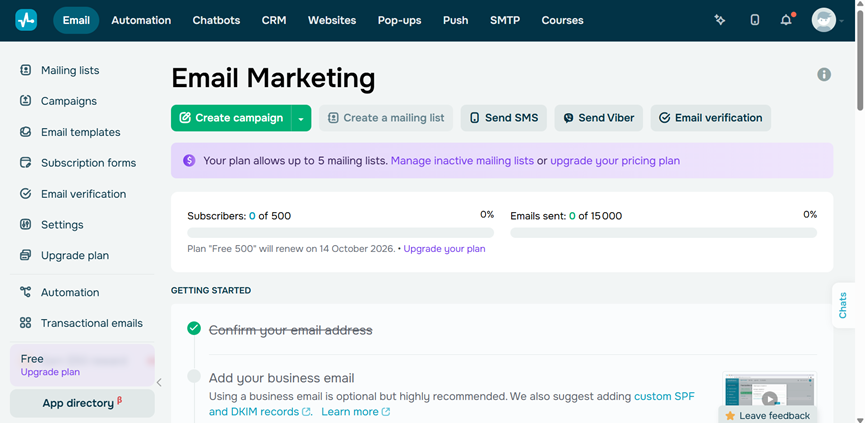
For bulk sending, the free plan covers 500 subscribers and 15,000 emails a month, and paid plans remove the monthly email cap. The SendPulse email service also connects to SMS, web push and chatbots.
Best for: small and mid-sized businesses that send often to a growing list and want email, automation and AI in one account.
Creating campaigns
- Drag-and-drop editor: builds responsive emails from blocks with text, images, buttons and video. Non-designers can ship a campaign in minutes.
- 140+ templates: ready-made layouts are available on every plan, including free. You start from a tested design instead of a blank page.
- AI assistant: writes copy from scratch, rewrites drafts, changes tone and translates into 10 languages. One campaign can reach several markets without a translator.
Segmenting and personalizing
- Dynamic segments: group contacts by location, behavior, interests and custom variables. Each group gets an offer that fits it.
- Personalization: inserts names, preferred language and other fields into the subject and body. Emails read as one-to-one messages.
- A/B testing: compares subject lines and email bodies on paid plans. You send the winning version to the rest of the list.
Automating
- Automation 360: triggers welcome series, abandoned cart reminders and thank-you emails from user actions. Revenue keeps coming in while the team works on other tasks.
- Resend to non-openers: sends a second version to people who ignored the first email. You recover opens without building a new campaign.
- Multichannel flows: combines email with SMS, web push and chatbots in one flow. A contact who skips the email can still get the message elsewhere.
Deliverability and analytics
- Email verifier: cleans invalid addresses before you send, included from the Pro plan. A cleaner list keeps bounce and spam rates low.
- Spam checker: reviews each campaign before it goes out. You catch trigger words and broken links before inbox providers do.
- Campaign reports: show opens, clicks, unsubscribes, errors and geography, plus Google Analytics tracking. You see which email drove revenue.
Pricing - Free plan: up to 500 subscribers and 15,000 emails per month, 5 automation flows, SendPulse branding in emails. - Free trial: not needed; the free plan has no time limit. - Standard: $12/month, or $9.60/month billed yearly, for 500 subscribers; unlimited emails, A/B testing, 3 users, no SendPulse branding. - Pro: $14.40/month, or $11.52/month billed yearly, for 500 subscribers; email verification, 10 users. - Enterprise: for lists of 2,500+ contacts; unlimited flows, users and sender addresses, dedicated support. - Yearly billing saves 20%, six-month billing saves 10%; prices rise with list size. See official pricing on the SendPulse website.
Pros - The free plan sends up to 15,000 emails a month. - Paid plans have no monthly email cap. - Email, SMS, web push and chatbots share one account.
Cons - Advanced automation has a steep learning curve for beginners. - The free plan adds SendPulse branding and caps the list at 500 subscribers. - Landing pages are only included in the Enterprise email plan.
What users say: “It’s a solid tool for small business owners and marketers who want an all-in-one solution without paying enterprise prices,” wrote Joshua P., a self-employed founder in marketing and advertising, in an April 2026 review on Capterra. He also noted that parts of the interface feel cluttered and that advanced automation takes time to learn.
Rating: 4.6 out of 5 on G2, with 721 reviews, and 4.6 out of 5 on Capterra, with 773 reviews.
What I like about this platform: I can import a list, run it through the verifier on the Pro plan, ask the AI assistant for a Spanish version of the newsletter, and send both versions to the right segments in one sitting. Non-openers get an automatic resend two days later.
2. Brevo: volume-based pricing for large contact lists
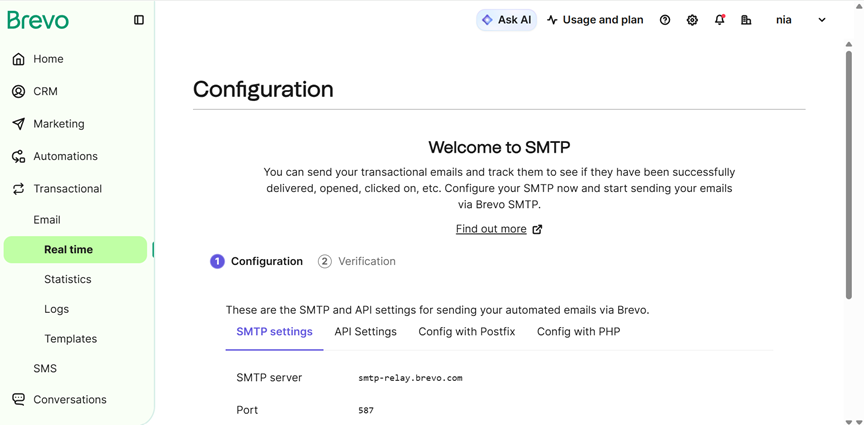
Brevo, formerly Sendinblue, is a French marketing platform founded in 2012 that says it serves more than 600,000 customers. It combines email, SMS, WhatsApp, push notifications and a CRM, and it also runs a transactional email service through SMTP and API. Its main difference from most competitors is the pricing model: plans are based on how many emails you send each month, not on how many contacts you store, which changes the math for anyone with a big but rarely mailed list.
Best for: businesses with large contact databases that send a predictable number of emails each month.
Creating campaigns
- Drag-and-drop editor: builds campaigns from blocks and saved templates. Marketing teams can launch without a developer.
- Aura AI Marketing Agent: generates copy and suggests segments. Small teams produce campaigns faster.
- Multichannel campaigns: sends SMS, WhatsApp and push messages from the same account. One audience can be reached on several channels.
Segmenting and personalizing
- Contact storage up to 100,000 on the free plan: you can keep a large database without paying. Pricing only rises when you send more.
- Advanced segmentation with web tracking: groups contacts by what they do on your site. Offers match real browsing interest.
- AI segmentation and contact scoring: ranks contacts on the Professional plan. Sales teams know who to call first.
Automating
- No-code automation: guided workflows for welcome, re-engagement and cart recovery emails. Common journeys run without manual sends.
- Unlimited workflows from Standard: removes the 2,000-contact automation limit of lower plans. Growing lists stay inside automated journeys.
- 150+ integrations: connects Shopify, WordPress, Stripe and Zapier. Store and payment data feed the campaigns.
Deliverability and analytics
- AI send-time optimization: delivers each email when the contact usually opens mail, on the Standard plan. Open rates improve without extra work.
- Transactional email included: order and password emails run on the same platform via SMTP or API. One vendor covers both email types.
- Dedicated IP on Enterprise: gives high-volume senders their own sending reputation. Other senders’ mistakes don’t affect you.
Pricing - Free plan: 300 emails per day, up to 100,000 contacts, Aura AI assistant, automation for up to 2,000 contacts. - Free trial: not offered; the free plan has no time limit. - Starter: $9/month, or $8.08/month billed yearly, for 5,000 emails, no daily limit; removing the Brevo logo costs $12/month ($10.80 billed yearly). - Standard: $18/month, or $16/month billed yearly; A/B testing, unlimited automation, 1 landing page, no Brevo logo. - Professional: $499/month, or $449/month billed yearly, for 150,000+ emails and 10 users. - Enterprise: custom pricing.
Pros - Contacts are stored free; you pay for the emails you send. - Transactional and marketing email live in one account. - AI features are available on the free plan.
Cons - The free plan caps sending at 300 emails a day. - The jump from Standard to Professional ($499/month) is steep. - Starter emails carry the Brevo logo unless you pay $12/month extra.
What users say: “The email designer is generally very intuitive and user friendly,” wrote Tayler O., a development strategist at a nonprofit, in an August 2026 review on Capterra. The same reviewer said connecting Brevo to other apps, including through Zapier, and moving contact attributes between systems is difficult.
Rating: 4.5 out of 5 on G2, with 2,750 reviews, and 4.6 out of 5 on Capterra, with 3,523 reviews.
What I like about this platform: an online store can keep its whole customer base in Brevo for free, send order confirmations through the transactional API, and use the same contact data for a monthly newsletter. When the newsletter grows, it only upgrades the email volume, not the contact count, so a seasonal business can send heavily in November and scale back in January.
3. Mailchimp: polished templates and a large integration ecosystem
Mailchimp is an email marketing platform founded in Atlanta in 2001 and owned by Intuit since 2021. It is one of the best-known names in email marketing and offers campaigns, landing pages, forms, SMS and automation flows. Its strengths are design quality and a very large ecosystem of integrations and tutorials. The trade-off is price: plans are tied to your contact count, and the free tier becomes much smaller in 2026, so growing lists move to paid plans quickly.
Best for: brands that care about design and need many integrations, with a budget that can grow with the list.
Creating campaigns
- Drag-and-drop builder: offers pre-built templates and custom-coded layouts on paid plans. Designers get room to keep emails on brand.
- Generative AI tools: write and adjust copy on the Standard and Premium plans. Teams draft campaigns faster.
- Landing pages and forms: available even on the free plan. List growth and campaigns stay in one place.
Segmenting and personalizing
- Audience segmentation: filters contacts by data, tags and activity. Each segment gets a relevant message.
- Predictive demographics: estimates audience age and gender. You can adjust creatively to who actually reads.
- Predictive segmentation: finds likely buyers on paid plans. Spend goes to the contacts most likely to convert.
Automating
- Marketing automation flows: up to 200 flows on Standard. Welcome, re-engagement and post-purchase journeys run on their own.
- Essentials flows: limited to 4 flow steps. A simple welcome series or a short post-purchase follow-up still works on the entry plan.
- 300+ integrations: connect e-commerce, CRM and analytics tools. Data moves without custom code.
Deliverability and analytics
- Send-time optimization: sends each campaign when contacts are most likely to open. Engagement improves without manual testing.
- A/B testing: compares versions of campaigns. You learn which subject lines and layouts win.
- SMS on paid plans: adds text messages to campaigns. Urgent offers reach people outside the inbox.
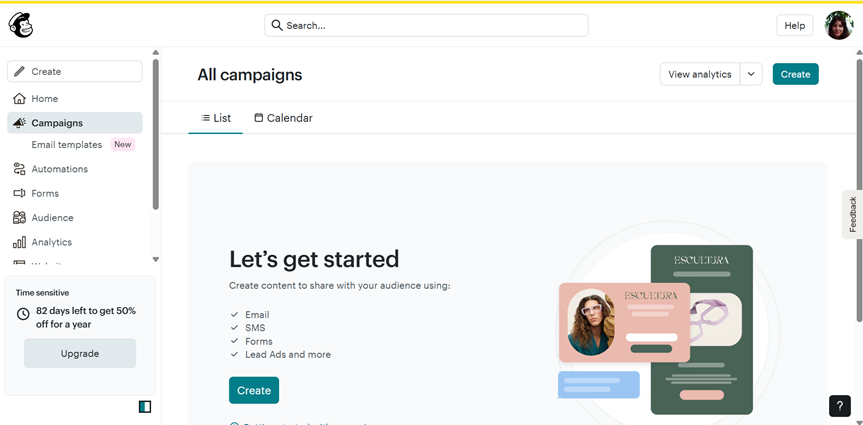
Pricing - Free plan: 250 contacts, 500 emails per month (max 250 per day), 1 user, no automation or generative AI. - Free trial: no standard trial listed; new customers currently get 50% off paid plans for 12 months. - Essentials: from 6.50 for the first 12 months), 3 users, sends up to 10× your contact count each month. - Standard: from $20/month ($10 for the first 12 months), 5 users, up to 200 flows, generative AI, sends up to 12× contacts. - Premium: from $350/month ($175 for the first 12 months), unlimited users, phone support, sends up to 15× contacts.
Pros - 300+ integrations cover most marketing stacks. - The builder and templates are polished and easy to use. - Landing pages and forms are included on the free plan.
Cons - The free plan is limited to 250 contacts and 500 sends. - Costs rise quickly as the contact list grows. - Automation and generative AI require paid plans.
What users say: “The layout is clean and well-organized, allowing users to quickly find key features,” wrote Elton Takudzwa N., a website owner at a 2–10 person capital markets company, in an April 2026 review on Capterra. He added that some emails still get flagged as spam and that deliverability sometimes needs extra setup.
Rating: 4.3 out of 5 on G2, with 12,943 reviews, and 4.5 out of 5 on Capterra, with 17,595 reviews.
What I like about this platform: a design-led brand can build a landing page, collect sign-ups through a form, tag new contacts by interest and start a welcome flow, all inside one tool. The template quality means the first email already looks like the brand. Because Mailchimp has been around so long, almost every e-commerce or CRM tool the brand already uses has a ready connector, so data flows in without custom work.
Which bulk email service to choose for each need
Best free bulk email service
SendPulse has the largest free sending allowance of the three: 15,000 emails a month to 500 subscribers. Brevo lets you store far more contacts for free but caps sending at 300 emails a day. Mailchimp’s free plan, at 250 contacts and 500 sends, works only for very small lists.
Best service for large email lists
Brevo is the strongest choice when the list is big but you don’t email everyone every day, because you pay for emails sent, not contacts stored. SendPulse suits large lists that get frequent campaigns, since paid plans have no monthly email cap. Mailchimp gets expensive fastest as contacts grow.
Best for AI-assisted email marketing
SendPulse’s AI assistant writes, rewrites and translates emails into 10 languages, which helps teams that sell in several markets. Brevo’s Aura AI agents go further into segmentation and data analysis on higher plans. Mailchimp includes generative AI from the Standard plan. For more tools in this category, browse the AI agents for email marketing on AI Agent Store.
Small businesses vs. larger companies
Small businesses get the most out of SendPulse, because the free plan and low entry price cover a lot of sending. Larger companies with dedicated marketing teams may prefer Brevo Professional for contact scoring and 10 seats, or Mailchimp Premium for unlimited seats and phone support.
Marketing plus transactional email
Brevo handles both newsletters and transactional emails such as receipts in one account. SendPulse offers a separate SMTP service with 12,000 free transactional emails a month. Mailchimp sells transactional email as a separate product.
Bulk email platform vs. email API: which do you need?
Many “bulk email” searches also surface developer services like Amazon SES and SendGrid. These are email APIs: they send huge volumes cheaply, but you build the templates, unsubscribe handling and reporting yourself. They make sense for product teams sending app notifications.
Marketing teams usually need a full platform instead. SendPulse, Brevo and Mailchimp include the editor, list management, compliance tools and reports out of the box, so a marketer can send a campaign without engineering help.
Conclusion
SendPulse is the best bulk email service for most small and growing businesses in 2026. It offers 15,000 free emails a month, unlimited sending on paid plans from $12/month ($9.60 billed yearly), and AI copywriting and translation in the same account as SMS and chatbots.
Brevo is the better fit for large contact databases with predictable sending, thanks to volume-based pricing and built-in transactional email. Mailchimp is the pick for design-focused brands that need 300+ integrations and can absorb higher costs as the list grows.
Before you choose, count your contacts and the emails you plan to send each month, then compare the official prices for that exact volume. Set up SPF, DKIM and DMARC on day one, whichever service you pick.
FAQ
Which service do you recommend for sending bulk email?
For most small and growing businesses, SendPulse is the best bulk email service in 2026: it sends up to 15,000 emails a month free and has no monthly email cap on paid plans. Brevo is a strong choice for large contact lists because it charges per email sent. Mailchimp suits brands that want polished templates and 300+ integrations.
What is the best bulk email service in 2026?
SendPulse ranks first in our comparison for its free sending limit, unlimited emails on paid plans and built-in AI assistant. Brevo ranks well for high-volume senders with large databases, and Mailchimp for design and integrations. All three support domain authentication and one-click unsubscribe, which Gmail and Yahoo now require from bulk senders.
What is the cheapest way to send bulk email?
SendPulse’s free plan covers 15,000 emails a month to 500 subscribers, and its Standard plan costs $12/month ($9.60 billed yearly) with unlimited emails. Brevo’s Starter plan starts at $9 a month for 5,000 emails. Mailchimp Essentials starts at $13 a month, or $6.50 during its current first-year discount. For app notifications at very high volume, an email API like Amazon SES costs less but needs developers.
Can I send bulk email for free?
Yes. SendPulse’s free plan sends up to 15,000 emails a month to 500 subscribers. Brevo’s free plan sends 300 emails a day and stores up to 100,000 contacts. Mailchimp’s free plan allows 500 emails a month to 250 contacts. Free plans add the provider’s branding and limit automation, so growing lists usually need a paid plan.
Which bulk email service is best for a large email list?
Brevo is usually the most cost-effective for large lists that you email occasionally, because you pay for emails sent rather than contacts stored. SendPulse works well for large lists that get frequent campaigns, since paid plans include unlimited emails. Mailchimp prices by contact count, so its cost rises fastest as a list grows.
Do bulk email services include AI features?
Yes. SendPulse’s AI assistant writes copy, changes tone and translates emails into 10 languages. Brevo’s Aura AI agents generate content, suggest segments and optimize send time, with advanced AI on higher plans. Mailchimp includes generative AI tools from its Standard plan. AI speeds up writing, but you should still review every campaign before sending.
What are the Gmail and Yahoo rules for bulk senders?
Gmail and Yahoo treat senders of more than 5,000 messages a day as bulk senders. They require SPF and DKIM authentication, a DMARC policy, one-click unsubscribe and a spam complaint rate below 0.3%. SendPulse, Brevo and Mailchimp all guide you through domain authentication and add unsubscribe links to campaigns.
What is the difference between a bulk email service and an email API?
A bulk email service such as SendPulse, Brevo or Mailchimp gives marketers an editor, list management, automation and reports. An email API such as Amazon SES or SendGrid sends messages through code and leaves templates, unsubscribes and reports to developers. Marketing teams usually choose a platform; product teams sending app notifications often choose an API.