
BeautyPlus vs Cleanup.pictures: Which AI Object Remover Is Better for Content Teams?
October 19, 2026 · 6 min read
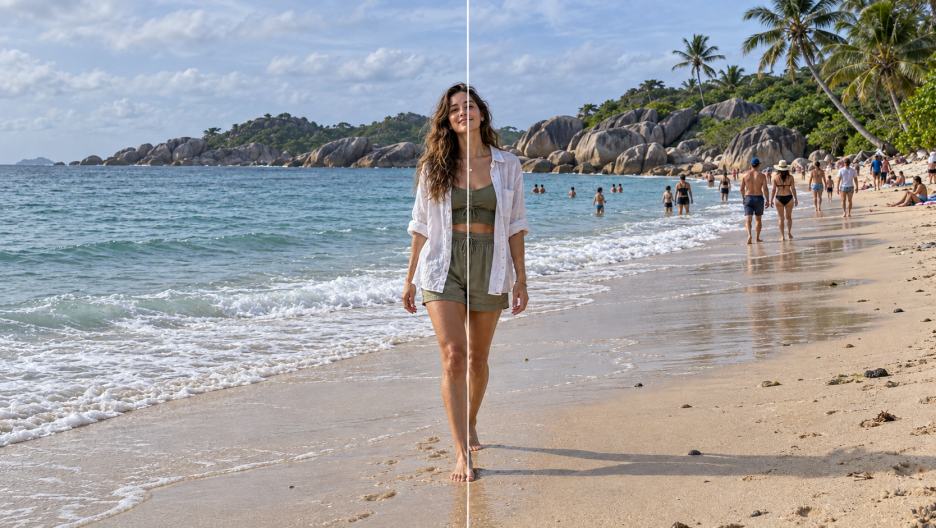
The same beach photo with background people removed on the left and retained on the right.
A content team cleaning a campaign image usually needs more than a dramatic demo. The main subject must remain unchanged, a broken railing or shoreline cannot be hidden by blur, and the downloaded file still has to be large enough for the publishing channel. BeautyPlus and Cleanup.pictures both promise browser-based AI inpainting, but they organise the work differently.
BeautyPlus offers a dedicated remove person from photo workflow alongside other task-specific cleanup tools. Cleanup.pictures uses a more narrowly focused canvas: paint over an unwanted person, object, text, or defect, then let the service reconstruct the covered area. The interfaces can appear similar at first because both avoid traditional clone-stamp editing.
The difference becomes clearer when a team must handle several kinds of assets. BeautyPlus also provides a remove watermark from photo online free page with automatic and manual modes for images the user owns, has licensed, or has permission to modify. Cleanup.pictures treats text and overlays through the same general brush-based removal process. Removing ownership marks from unauthorized material may violate copyright or licensing terms.
This comparison examines current public features, workflows, output policies, and pricing rather than claiming a controlled speed or image-quality benchmark. Actual inpainting quality will vary with subject overlap, background complexity, shadows, reflections, and source resolution.
BeautyPlus vs Cleanup.pictures: Overview
| Factor | BeautyPlus | Cleanup.pictures |
|---|---|---|
| Primary approach | Dedicated people, object, text, and watermark workflows | Single brush-based cleanup canvas |
| People removal | Brush/highlight the person; AI fills the area | Paint over the person; AI reconstructs the background |
| Watermark and text cleanup | Separate watermark tool with Auto and Manual modes | General brush removal for text and overlays |
| Platforms | Mobile and desktop web browsers | Mobile and desktop web browsers |
| Free access | Official pages describe people and watermark tools as free | Unlimited free processing; exports capped at 720px |
| Paid plan | No subscription listed for the compared web tools | US36/year for unrestricted resolution |
| Workflow breadth | Broader collection of task-specific photo tools | Focused object-removal experience |
Key Takeaway
The products share the same basic inpainting idea but differ in scope. BeautyPlus separates common cleanup jobs into dedicated experiences, including people removal and automatic or manual watermark detection. Cleanup.pictures keeps the interface concentrated on one repeatable gesture and publishes a simple free-resolution limit with a low-cost Pro upgrade. Neither public feature list can guarantee a clean result on every background.
Core Editing Approach
BeautyPlus
The dedicated Remove People page instructs users to upload an image, adjust the brush, highlight the person with a mouse or finger, and allow the AI to erase the selected content and fill the opening. BeautyPlus’s broader Object Remover also describes category-based detection for people, text, shadows, and other distractions. The separate Watermark Remover offers Auto mode for detecting logos or text and Manual mode for brushing over missed areas.
This task-specific organisation can reduce ambiguity when a content team already knows what needs to be cleaned. It also means that related jobs may live on different pages rather than inside one universal canvas.
Cleanup.pictures
Cleanup.pictures uses a general brush workflow. The user imports an image, paints over an unwanted person, object, text, blemish, or defect, and lets the inpainting model reconstruct what was behind it. The same interaction is repeated regardless of the type of distraction.
The narrower design keeps the learning curve short. It offers less explicit guidance by content type, so selection quality and the user’s judgment remain important when shadows, reflections, or detailed edges are involved.
Removing People and Crowds
For an isolated tourist against sky, sand, or open water, both workflows provide the selection-and-fill process required for a credible edit. The harder test is a person standing over patterned paving, railings, furniture, another subject, or a reflection.
BeautyPlus frames its dedicated tool around people and provides brush-size adjustment for refining the selected area. Cleanup.pictures asks the user to cover the unwanted element fully with its cleanup brush. In either product, selecting the person without their shadow, reflection, bag, or loose clothing can leave visible evidence behind.
Crowds introduce another limitation: the software has less evidence about the hidden background. Removing people individually may preserve more context than covering one large block, but that is an editing practice rather than a guaranteed product advantage. Teams should review straight lines, repeating textures, faces, and the main subject at full size before accepting either output.
Watermarks, Text, and Other Distractions
BeautyPlus provides a dedicated Watermark Remover that currently lists automatic detection for watermarks, logos, text, and stickers, plus a Manual mode for brushing over a selected mark. That separation is useful when an overlay has a predictable outline or appears in several places.
Cleanup.pictures can remove text and overlays through its standard cleanup brush, but its public workflow does not present the same task-specific Auto and Manual watermark modes. The user paints over the mark in the same way as an unwanted object.
Capability does not determine permission. Teams should retain proof that they own the file, licensed it, or received authorization to remove the mark. Draft layouts, company-owned assets, obsolete timestamps, and mistakenly applied internal logos are different from stripping attribution from third-party stock photography.
Ease of Use and Learning Curve
Both services work in a browser and replace manual clone-stamp work with direct selection. Cleanup.pictures has the more uniform interaction because nearly every job begins and ends with the same brush. BeautyPlus divides work by task, which adds navigation but can make the intended operation clearer to a non-specialist.
Neither requires a long professional-editing learning curve. The real skill is selection discipline: using a smaller brush near the main subject, including related shadows, and knowing when an AI-generated patch no longer matches the source scene.
Control and Editability
The dedicated BeautyPlus People Remover documents adjustable brush size and touch or mouse selection. Its watermark workflow adds automatic detection and a manual fallback. Cleanup.pictures centres control on brush coverage and repeated cleanup passes.
These controls are adequate for common distractions, but they are not equivalent to a layered desktop editor with masks, clone sources, and manual compositing. A content team handling product labels, legal evidence, architectural lines, or identity-sensitive portraits should preserve the original and inspect every changed region.
Output Quality and Naturalness
Public product descriptions from both services emphasize background reconstruction, but naturalness cannot be judged from the feature list alone. A plain beach or wall is easier than patterned clothing, crowds, reflections, or a person overlapping the main subject. Source compression also limits what the model can infer.
BeautyPlus’s broader Object Remover page states that high-resolution output is the default and is available without an extra high-resolution charge. Cleanup.pictures accepts images of any size, but its free export is capped at 720px; Pro removes that resolution limit and adds its high-quality refiner. This policy difference matters when an edit is intended for print, ecommerce zoom, or later cropping.
Processing Speed
Both are cloud-based browser tools, so processing time depends on file size, connection quality, server demand, and the size of the selected region. Neither current public page provides a directly comparable benchmark. A responsible workflow should therefore test representative files rather than treating “seconds” claims as a fixed production time.
Platforms and Privacy Considerations
BeautyPlus and Cleanup.pictures both support browser access from desktop and mobile devices. That convenience also means images are uploaded for processing. Before using either service with client campaigns, unreleased products, employee images, or sensitive documents, teams should review the current privacy and retention terms rather than assuming that browser convenience implies local processing.
Pricing and Free-Version Limits
BeautyPlus
BeautyPlus currently describes the dedicated People Remover and Watermark Remover as free browser tools. The watermark page states that no account or payment is required. Because online limits can change, teams planning repeated or high-volume work should confirm the live page before committing a production queue.
Cleanup.pictures
Cleanup.pictures allows free processing of unlimited images but limits free exports to 720px. Its official pricing page lists Pro at US$5 per month or US$36 per year, equivalent to US$3 per month when billed annually. Pro removes the resolution cap and includes the high-quality refiner. Pricing is straightforward, although taxes and future plan changes may still apply.
Final Assessment
BeautyPlus and Cleanup.pictures reduce a traditionally manual editing task to direct selection and AI inpainting, but they organise that capability differently. BeautyPlus presents a wider set of task-specific cleanup tools, while Cleanup.pictures concentrates on a single removal canvas with a transparent 720px free-export boundary and inexpensive Pro tier.
The deciding evidence should come from representative assets rather than promotional examples. A useful trial includes an isolated person, a crowd, a repeating background, a shadow or reflection, and an authorized text overlay. Reviewing those outputs at the required publication size will reveal more than a generic claim about one tool being “better.”